Finding a gaming gift is easier when you start with how the recipient plays: at a desk, on a console, with friends, or while streaming.
These nine ideas cover useful gear and shared entertainment, from everyday setup upgrades to a projector for a bigger-screen game night.
9 Gift Ideas for Gamers
SteelSeries Arctis Nova 7P Wireless Gaming Headset

- Neodymium magnetic drivers deliver a soundscape with clear highs, mids, and bass.
- Mix calls or music from a mobile device with game audio.
- The retractable microphone can be hidden for a commute.
Best Gift For: A console or PC player who wants one headset for gaming and mobile audio.

SteelSeries Apex Pro TKL Gaming Keyboard

- Per-key actuation has 40 adjustment levels.
- A key can be programmed for two different actions.
- The tenkeyless keyboard has a detachable USB-C connection.
Best Gift For: A PC gamer who likes tailoring key response for different games.
SteelSeries Rival 5 Gaming Mouse

- Its layout includes nine programmable buttons.
- Five side buttons provide quick actions.
- The optical sensor offers true one-to-one tracking.
Best Gift For: A player of fast-paced games who would use programmable side buttons.
FIFINE AmpliGame AM8W XLR/USB Gaming Microphone

- USB and XLR connections suit different audio setups.
- Tap-to-mute and a gain knob put controls on the microphone.
- RGB lighting can be switched or changed with a tap when using USB.
Best Gift For: A gamer who streams, records voiceovers, or wants a desktop microphone.
HUANUO FlowLift Dual Monitor Stand

- Each arm supports a screen within the specified size and weight ranges.
- The mount offers tilt, swivel, and rotation adjustments.
- Built-in cable management guides cords along the arms.
Best Gift For: A gamer with two compatible monitors and a suitable wooden desk.
TP-Link Archer AXE75 WiFi 6E Router

- Tri-band WiFi 6E includes a 6 GHz band.
- OFDMA technology is designed to increase device capacity.
- It supports a OneMesh network with a compatible TP-Link extender.
Best Gift For: A gamer whose household wants to connect multiple devices on a home network.
Nylavee Computer Speakers with 6 Lighting Modes

- The speakers offer six touch-controlled lighting modes.
- A single knob controls power and volume.
- Audio connects through a 3.5mm cable, with USB for power.
Best Gift For: A PC gamer who wants desktop speakers with adjustable lighting.
TMY 1080P Mini Portable Projector with 80in Screen
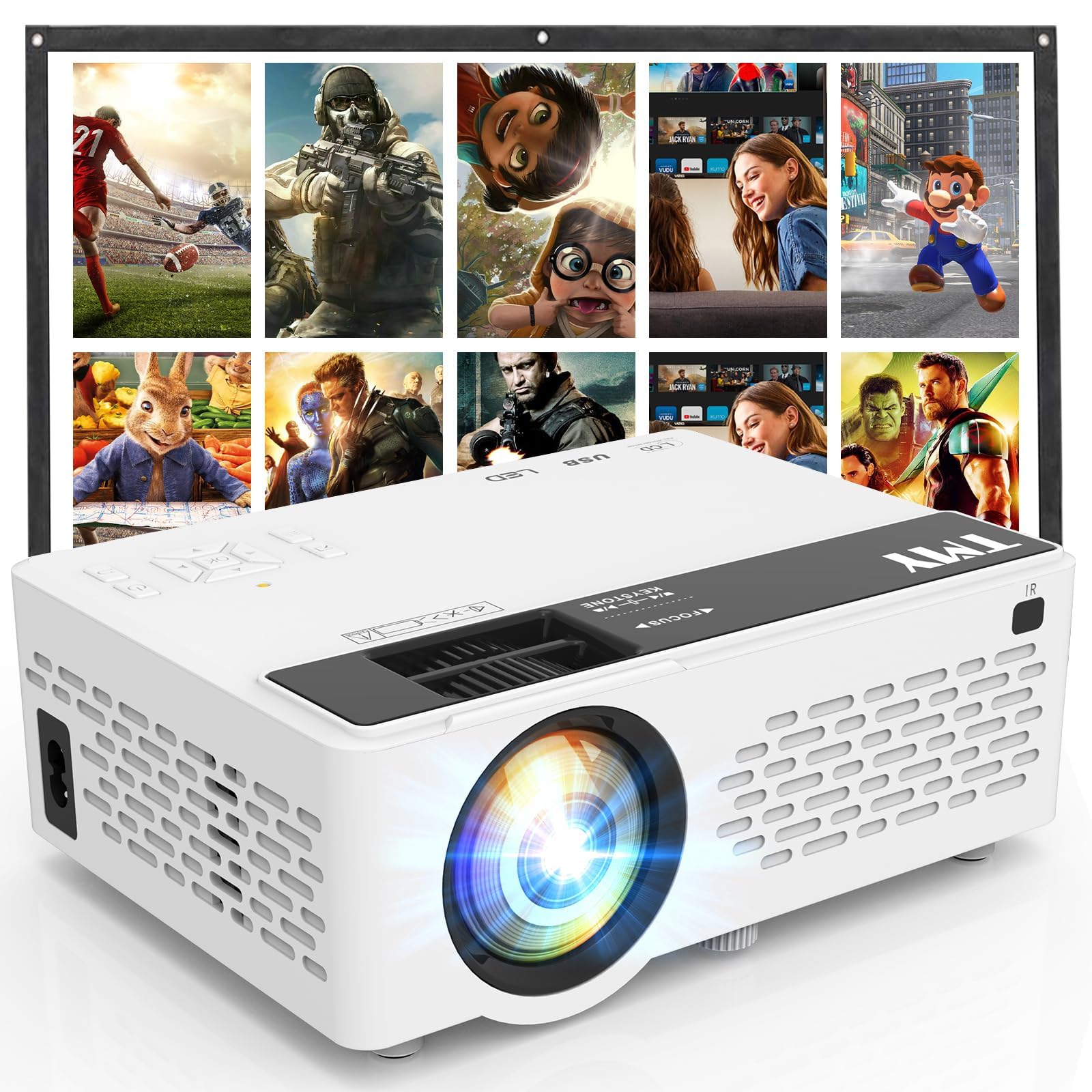
- An 80-inch foldable projection screen is included.
- The projector supports 1080P Full HD video.
- It connects with gaming consoles through HDMI or USB ports.
Best Gift For: A gamer who enjoys playing or watching with friends on a larger projected image.
SABRENT USB-C 6-Port Hub & M.2 SSD Dock

- The hub includes USB ports, power delivery, networking, and an M.2 slot.
- Its HDMI port supports an external display at up to 4K@60Hz.
- The M.2 slot supports SATA or NVMe SSDs.
Best Gift For: Steam Deck or ASUS ROG Ally owners who want extra ports and portable storage.
How to Choose gifts for gamers by Play Style
When choosing gifts for gamers, think about where and how the person plays. A PC player who spends hours at a desk may appreciate a focused setup upgrade, while someone who moves between a handheld device and a larger screen could make more use of portable connections.
Consider what already gets used every session. A headset or mouse is a personal choice, so check the recipient’s platform and preferences before buying.
Accessories that address a clear setup need, such as tidier cables or more desk space, can be easier to choose when you know the current arrangement.
For a shared household, think beyond the person opening the gift. A network upgrade or projector may suit a home where people stream, play, and watch together.
Match the idea to their routines, and consider whether the gift will need another person’s help to install or configure.
Set a Comfortable Gift Budget
Gaming gear spans simple desk additions through larger setup changes. Decide what feels comfortable to spend, then compare the practical benefit: a small accessory may solve an everyday annoyance, while a bigger item can involve compatibility checks or extra setup.
For gifts for gamers on a tighter budget, focus on one useful item rather than assembling a bundle of extras the recipient may not need. A thoughtful choice can be a single upgrade that fits their current gear, especially when you have confirmed the device or connection it needs.
If you are considering a larger purchase, check current prices and what is included before deciding. Leave room for possible accessories or installation needs, and avoid assuming that a device will work with an existing setup just because it is gaming-related.
Personalize gifts for gamers Around Their Setup
The best clue is often a small detail the person has mentioned: crowded desk space, hard-to-reach controls, or wanting to play with friends in another room. Use that clue to choose a gift that fits their habits, instead of guessing from a favorite game alone.
Presentation can make practical gifts feel personal. Add a short note explaining why you picked it, or pair the gift with a plan for a relaxed game night.
For shared equipment, consider wrapping a small related item separately to make the main gift feel like an occasion.
If a gift needs setup, offer help only if the recipient would enjoy that. Some gamers like configuring their own gear; others may appreciate a hand checking connections and arranging the desk.
Keep any add-on simple and let them decide how to make the equipment their own.
Check Compatibility Before You Buy
Before ordering, confirm the recipient’s device, available connections, and space. For a desk mount, check the monitor and desk requirements carefully; for a hub or audio gear, verify that the intended computer or handheld supports the needed connection and features.
Read the current product details for compatibility, dimensions, included cables, and any components that may need to be purchased separately. This matters especially for gifts that affect a whole setup, since an item can be a thoughtful choice yet still need a specific desk, display, or device.
If you cannot check directly, ask someone who knows the setup or choose a gift with a clear, flexible use. Keep receipts and packaging intact until compatibility is confirmed, following the retailer’s current return terms rather than assuming a particular return window.
Last-Minute Shopping Advice
For a last-minute gift, start with what you can verify quickly: the recipient’s platform, the device they use most, and whether the gift will fit their space. Check the current delivery estimate and availability at checkout; timing can vary by location and seller.
A digital note or a planned game night can make a useful gift feel complete if the physical item arrives later. Be straightforward about the timing, and avoid promising a specific arrival date until the order details confirm it.
When choosing among these gifts for gamers at the last minute, favor a known need over a technically ambitious upgrade. Verify compatibility, dimensions, included pieces, and delivery estimates before placing the order, then wrap it with a brief note about how you hope they will use it.